Tuesday, June 8, 2021

Publish your github project to sonarcloud.io

 1). Go to sonarcloud.io and click on the "+" icon at the top of the screen.


2). Then click on the Choose an organization on GitHub

3). You will be redirected to your GitHub account and from there you have to select the repository which include your project.(From here you will give permissions to SonarCloud, to access the repositorys)


4). Then you will re-direct to SonarCloud and you will see something similar to this.

5). Select with GitHub actions

6). Then will navigate to an instruction page.

7). Follow the 1st instruction as it is.

8). Add below aditionl command to the build.gradle file. (Source can be any thing,This can be different based on your project structure)
property "sonar.sources", "."

After step 8 I had only sonar related things in my build.gradle file, Becouse I had few errors when try to update my existing build.gradle file with sonar settings.

9). Next follow the 2nd step. If you don't have a workflows folder inside .github, please create it manually and just copy and paste the content as it is.


10). Then do some changes to any of your code and make a commit.

11). Navigate to Actions menu.


12). Because of your commit, an action should be triggered.

13). If all the above steps are correct you should see the build log and there should not be any errors.


14). Finally, navigate back to https://sonarcloud.io/  you should see the dashboard with all the details.


Tuesday, December 8, 2020

How to set M2 path ans install Maven on macOS Catalina v 10.14.XX

 On previous mac Operating systems we just download the Maven and add path to .bash_profile file inside the user path.

That's because when we open a terminal from mac it opens a bash type of terminal as on the below image.


But with the latest macOS bash type terminals are no longer available.

Now we have zsh type of terminals.


There for even you add paths to .bash_profile Maven is not going to work.

So you have to edit .zshrc file inside your users folder.


So locate the .zshrc file or if not create a new file and add below lines to the .zshrc file.(As you normally do with .bash_profile file).

export M2_HOME=/Users/<your profile name>/Documents/Data/apache-maven-3.6.3
export PATH=$PATH:/Users/<your profile name>/Documents/Data/apache-maven-3.6.3/bin

Thursday, October 22, 2020

Copying Rest API command from Postman is not working in C# RestSharp? Here is the fix!

 As we all know if we click on the code button as on the image we can convert the Postman command to any sort of programming language.


Here are some languages we can convert the code.


But if you directly copy and past the code for C#-RestSharper then your code might not work.

There won't be any exceptions, But you will not get the response that you are expecting.

It always returns NULL response.


To make it work you have to do some adjustments.

Below is the original code and just comment the highlighted line which is  request.AddHeader("Connection", "keep-alive");


Actually to get this code work you need to add "using RestSharp" to your C# code.

Other thing is no need to add all these headers to get a valid output, You can simplify the above code by only having below lines.

request.AddHeader("Authorization",....);

request.AddHeader("Content-Type", "application/json");


Monday, August 3, 2020

How to change IP address time to time from selenium C#


  1.  [TestMethod]
  2.         public void ChromOptions()
  3.         {

  4.             string[] proxies = { "206.198.131.142:80", "51.81.112.164:5836" };

  5.             for (int i = 0; i < proxies.Length; i++)
  6.             {
  7.                 ChromeOptions options = new ChromeOptions();
  8.                 options.AddArguments("--proxy-server="+proxies[i]+"");
  9.                 driver = new ChromeDriver(@"C:\ChromeDriver1\", options);
  10.                 driver.Navigate().GoToUrl("https://whatismyipaddress.com/");

  11.             }
  12.         }

Above is a C# code to switch your browser IP.
At line 5 you have to give a list of working proxy IP and the PORT list as an array.

Thats it.

Sunday, June 21, 2020

How to move files from all the sub directorys to another which dont no the directory name

I had an issue where I need to move some files from one folder to another folder but the challenge was the source folder name get change time to time.
Basically the folder name will be a random GUID.

So I was unable to stick to a simple windows batch command because I don't n know the exact source folder name where my files available.

So this is a simple solution for that.
Just download the below EXE file and pass the arguments as it shows.

Basically what it does was extract everything from subfolders (what ever the sub folder name) on a given folder and place them on another folder.

https://drive.google.com/file/d/1v-JbHRvzXdfpMYfpZoAvEetLx2Bdzi4E/view?usp=sharing

MoveFiles.exe "source folder where your files stay" "Target folder where you want to move the files" "what kind of file extensions you need to move"

MoveFiles.exe "C:\Development\XXX\XXX" "C:\Development\XXX\XXX"  "*.XXX"


Thursday, June 18, 2020

Dotnet Code Coverage for SonaQube

It's not that much hard.
If you are with dot net 2.0 or above then just execute the below command on your test project location.

(where the XXX.Test.csproj available.)

1).dotnet test --collect "Code Coverage"

Then the tests will get to execute and at last there will be a coverage file available as on the test result folder.

Attachments:
  C:\Program Files (x86)\Jenkins\workspace\Backend Dev\test\Api.Test\TestResults\88de1678-d457-4e6c-a3fd-2d5786cddc13\ar0_2020-06-18.10_24_43.coverage
Total tests: 132. Passed: 66. Failed: 57. Skipped: 9.
Test Run Failed.
Test execution time: 44.3640 Seconds

Then convert the .coverfile to coveragexml file using below command.

2).CodeCoverage analyze /output:VisualStudiot.coveragexml  ar0_2020-06-18.10_24_43.coverage

You can use below nuget command to download the CodeCoverage packages.

dotnet add package Microsoft.CodeCoverage --version 16.6.1


The just point the newly created coveragexml file to sonar server by below code.

3).sonar.cs.vscoveragexml.reportsPaths=C:/Development/VisualStudiot.coveragexml

Thursday, May 28, 2020

How to open browser windows one by one with Jmeter selenium

I had this issue with me when I'm working on a project.
Because When I set thread count to 100 it will open 100 browsers and the CPU and other resource utilization going up.
So unfortunately server will get hang.

I have post the same issue in https://sqa.stackexchange.com/ but still I didn't get any proper solution.

So I start my own to find a solution.
Then I found

You have to download below plugin to J meter.
https://jmeter-plugins.org/wiki/ConcurrencyThreadGroup/


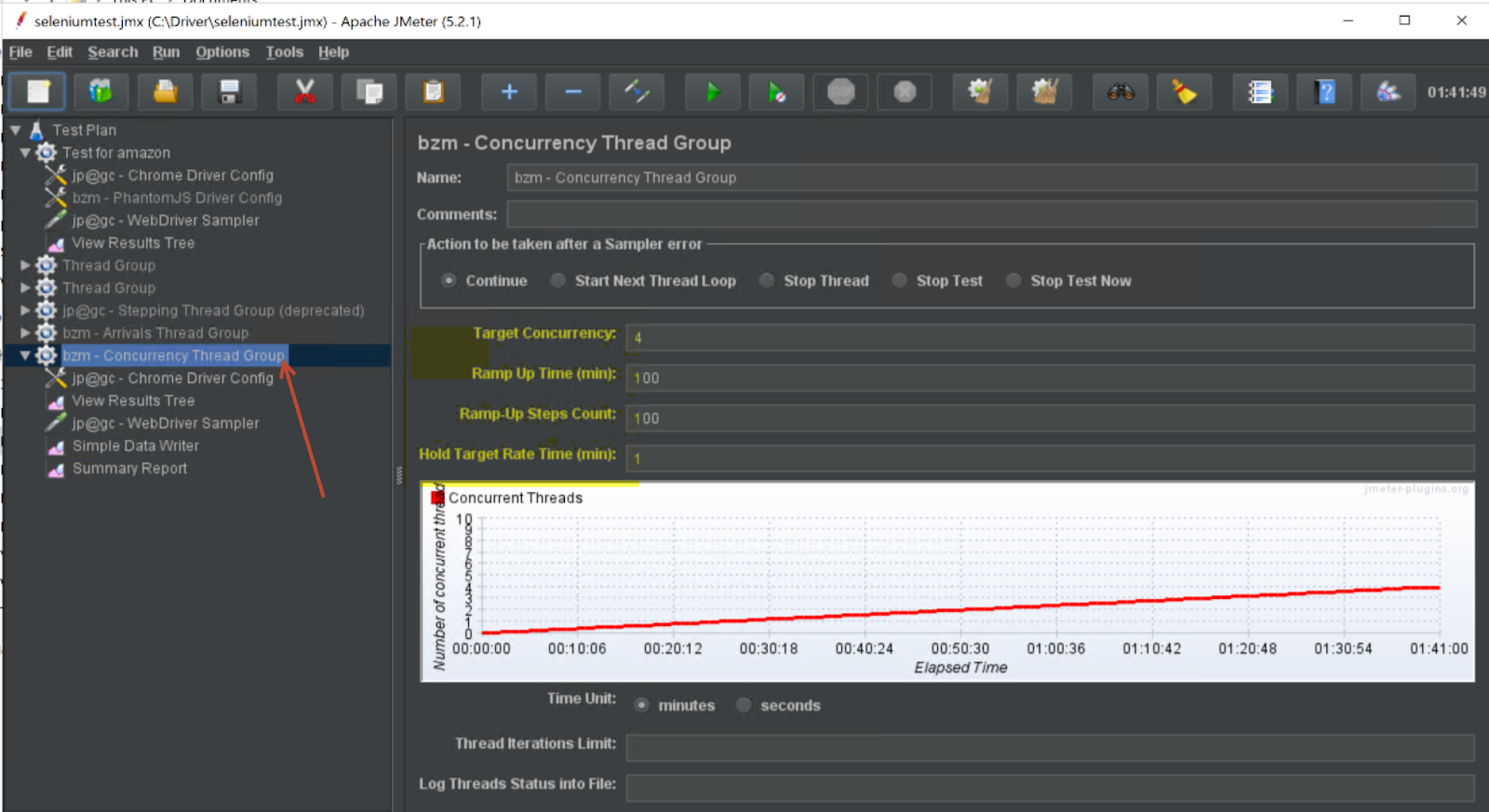
  • Add the bzm - Concurrency Thread Group.
  • Set the parameters as on the image.
  • So it will run for a couple of hours without eating your server resources.

While its running you can do your other work.